Thứ Sáu, 27 tháng 3, 2009

Installing applications, including content such as multimedia music, video to BlackBerry phone is easy

Many people feel, install the application and transfer of content to the smartphone is very difficult. However, when used smart phone, you should know the settings, and practice, this is not so difficult. BlackBerry is an example.

Bringing applications to BlackBerry

There are three ways to install the application on the BlackBerry device. First is through the Application Loader software on the BlackBerry Desktop Manager. This program will support add, delete or update existing applications. During the installation, data in the backup automatically.

Installed, removed more applications on the Application Loader.

The second way, users can download applications through the web browser on your BlackBerry. In addition, users can optionally software third by going to computer data, Internet connection or Bluetooth connection to transfer files, click the gadget downloaded and then installed.

Then, it will reboot, and the program can run normally after that.

Bringing music, video on

Besides using a cable connection, users can also take entertainment content to the BlackBerry via Bluetooth.

When connected with cable (via mini USB port) with a computer, can choose Mass Storage mode. Then, easily drag, drop the data file to your phone's memory or external memory card. This method is faster than the synchronous, data.


An alternative, you can use Media Manager on the BlackBerry Desktop Manager. This program can scan the folder on your computer and add a message before transfer, synchronous.

Also, can select the LiveShare software, video sharing, MediaSpace (UPnP) share multimedia files for use in the family.

The audio format that curve 8900 support: .3 gp, WAV, MIDI, AMR-NB, G711u / A, GSM610, PCM, MP3, AAC / AAC + / eAAC +, WMA9/10 Standard / Pro.

Video formats that curve 8900 support: DIVX, Xvid (MPEG4 Advance Simple Profile), H.263, WMV3.

Thứ Tư, 25 tháng 3, 2009

F1 Season 2007 by Deepweb All-Res v1.40


Palm F1 Season 2007 by Deepweb All-Res v1.40 freeware

F1 Season 2007 gives you detailed information about the F1 championship Season 2007.

This version contains all display resolutions, from 160x160 B&W up to full colour 320x320 graphics.

F1 Includes:

  • Circuits
    • Unique graphics
    • Circuit information
    • Results (here you can add the race results)
  • Drivers and Teams
    • Additional information
    • Driverslist
    • Teamlist
  • Championship (fast and simple)
    • Driver
    • Team
  • Statistics (numeric and GRAPHS)
    • Each Driver
    • Each Team
  • Info Center
    • Driver Championship
    • Team Championship
    • Tyre Championship
    • Fuel Overview
    • Calendar
    • Next Race
  • F1 in your Datebook
    • Add GP Events
    • Remove GP Events
    • Update GP Events

T-Crisis v5.9

Palm T-Crisis v5.9 freeware

Play 100% FREE perfect Tetris with amazing graphics, sound, and music on your Palm PDA/Smartphone...

"TetriCrisis 100%" Version 5.9FINAL Features:
- 100% FREE fun!,
- Runs 100% perfectly on any Palm with O.S. 3.5 or higher,
- 100% arcade perfect Gameboy Tetris to Palm conversion of the original,
- Beautiful full color and high resolution visual graphics,
- Awesome digital sound effects,
- Amazing digitally orchestrated soundtrack featuring over 30 minutes of CD quality music!,
- Perfect control with available 5-way navigator and hard buttons or use your pen stylus to control pieces,
- 7 different and exciting game modes including original Gameboy mode and the incredibly unique \"Crisis+Mode\"!,
- Saved high scores table for each game mode,
- Fully customizable game options and saved game preferences, including: new game garbage level, new game start level, display next piece on/off, display drop shadow on/off, display background on/off...

With over 50,000+ downloads in a previous c|net release, TetriCrisis 100% has been hailed as: "The Greatest FREE Palm Tetris Game Of All Time"...

Chủ Nhật, 22 tháng 3, 2009

Google launched Google Sync for mobile phone

Google has just announced the introduction of testing Google Sync - a tool that allows you to synchronize the device platform Windows Mobile, iPhone or any phone support other formats SyncML with Google Calendar and Contacts your Gmail contacts.

Currently, the experiment with the Google Sync just offer two features, but in the near future will feature additional synchronize e-mail reminder list to do ...

Through this application, Gmail address book and Google Calendar will automatically synchronize with your phone at any time. Changing an event on your phone means you have to immediately change, update on the web and vice versa.

In fact, depending on levels of use that know the importance of Google Sync. For business people want the same text, the relationship here is a tool can not be lacking. But for the remaining community groups under the different Google Sync is only suitable for some small.

In addition to support Windows Mobile and iPhone, Google Sync is compatible with the BlackBerry line of devices and use the Symbian operating system S60. Besides, if you are in any device which allows the SyncML open it using Google Sync is entirely possible, however there is a limit can only interaction between the directory and not be interactive calendar.


Note that Google Sync uses the Microsoft Exchange ActiveSync © ©, so as to set an account new Exchange ActiveSync on your phone, all Contacts and Calendar events exist on the machine may be deleted. Therefore, make sure that you have created a backup for all important data before working with Google Sync.


You to download Google Sync for appropriate equipment and to refer to user guide.

Thứ Sáu, 20 tháng 3, 2009

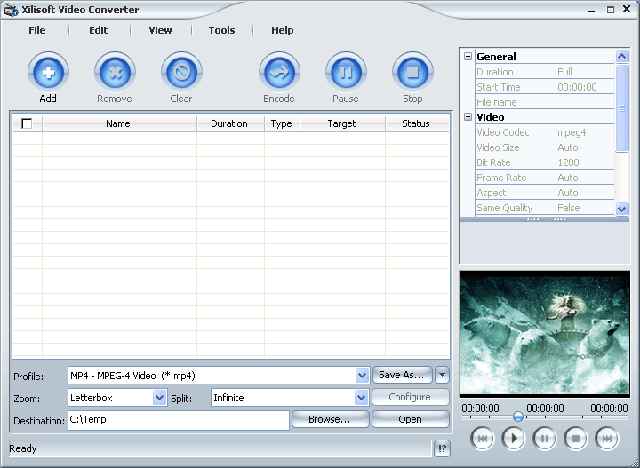
Xilisoft Video Converter:


Support conversion of video files flv, swf DVD, VCD, SVCD, MOV, RM, AVI, MPEG, WMV, 3GP, H.264/MPEG-4 AVC, AVC H.264/PSP etc. ...
In addition, software is an easy way to convert video files into audio files including MP2 applications, MP3, AC3, RA, m4a file format, OGG, AAC etc. ... It also supports resolution code Ape, CUE and separating music from disk CD.
Video converter can also convert other formats to use for video iPod and PSP. You can select codec for video and audio, set the parameters of output. All conversion processes, such as from MPEG to AVI, WMV to MPEG, WMV to AVI, extremely easy and fast with high quality

Backup and restore data for Rim BlackBerry

Backup the information on your BlackBerry may have a little difference, however, its performance gives you is fantastic. Follow the instructions included in four steps, you will avoid the risks are not following this.


Anyone who has encountered situations lose all data on a computer or a handheld computer to understand the value of backup personal information, whether it is a collection of iTunes music files, photo albums list number or contact. Talking always easier to do, but for BlackBerry users to have a fortunate: The backup data celery and recovery process for smart phones Research In Motion (Rim) can not simply when you use the BlackBerry Desktop Manager software, this software is provided for all new equipment Rim.

Before this article, we have introduced some tips for saving battery for BlackBerry, but in this article, we will introduce you how to protect the data value on the machine by hand you using it to backup a computer hard drive - in the instructions, we will present how to automatically backup data from your device in the time booking.

To get started, all you need to do with the BlackBerry's download is the latest version of BlackBerry Desktop Software Manager, Microsoft Windows PC and USB cable to link mobile devices with your PC staff.

1. Download the latest version of BlackBerry Desktop Manager

First, you need to download the latest version of BlackBerry Desktop Software Manager, current version is released at this time is v4.5. To specify which version of Desktop Manager you're using, then launch the program through the Windows Start menu by click All Programs, and BlackBerry Desktop Manager. When the program is open, inhaling Help tab on the main screen, then choose About BlackBerry Desktop Manager. Version of the software will be listed in the General tab.

If you are not running Desktop Manager v4.5, visit the site and download Rim, install the latest version of this software.

2. Launch Desktop Manager, connect the BlackBerry with the computer

To, launch the software. Follow procedure above to open the program if you do not choose to create a shortcut icon on the desktop screen. When the program started, connect the BlackBerry device to your computer via USB cable. Close the dialog box that appears when the BlackBerry was connected, and this dialog box includes desktop manager to let you know that it is looking for upgraded applications.

Your BlackBerry then need to connect to the software and "Connected" should appear in the corners and on the left bottom of the screen desktop manager. If you still are not connected, try to plug the device and connect it to a different USB port.

3. Backup all or some data on your BlackBerry

Click the icon Backup and Restore the upper right hand corner of desktop manager screen. Screen below will give you three options: Backup, Restore and Advanced. To save all personal data in the memory of the BlackBerry, inhaled Back up the tab, select the name and location for the file and hit Save. BL process will take a few minutes, the screen will display the BlackBerry image in your handheld is connected to the computer during backup.

You also can set up BlackBerry Desktop Manager automatically backup data device in the set period of time ago (5 days, 7 days or 14 days, ...) whenever you start the program and connect devices handheld with your PC. To make so, you click Options tab below the Backup icon on the screen that appear after you fill the checkbox next to Back up my device data automatically every XX days. Then select the data that you want to backup. For example, you can choose to backup all data in the device or all data except the mail data is synchronized with another application. Once selected the information you want to copy, hit OK and then Back up the tab size on the screen.

To further customize the specific information you want to backup, enable the Advanced tab on the screen Backup and Restore. You will see a dialog box that displays the process of scanning the database of device applications, then a screen two columns: a column on the left named Computer Databases also named the other columns Device Databases. In the right column, select the data you want to backup and hit the arrow to the left two columns to keep the copy information from the Device Databases Computer Databases. When has all want to copy data, open the File menu - located directly on the column Computer Databases - choose a name for the backup file and save it to hard drive.

4. Restore data using the BlackBerry Desktop Manager Files

The recovery data for handheld devices using the desktop manager software and backup files created by applications completely simple. First, you need to find backup set file for easy search when you restore the data. To, applications launched BlackBerry Desktop Manager, click the icon in the Backup and Restore upper right hand corner and in the next screen, select Restore. Browse to the corresponding backup file on the hard drives and enable Open. Then you will be asked to confirm that you want to replace all data on existing equipment with the information in the file backup. Hit Yes, desktop applications manager will start the process of recovering your data. This process takes place a few minutes depending on the amount of information in the file.


Restore only partial data, such as contacts, or AutoText entries, completely similar to the above, but instead hit the screen in the Restore Backup and Restore and you click Advanced. Then open the File menu on the left - directly on the column Computer Databases - and open file backup are available. Select specific data you want to restore from file and click the arrow between two columns and Computer Databases Device Databases. When the dialog disappears is the time your data was restored

Palm open App Store

Not in the least competitive races Mobile 2.0, Palm has just shop online, so that users can buy applications directly from handheld devices via their internet.

Palm's Software Store, including more than 5000 applications and games for the Palm PDA vaf smartphone. Users can purchase and download directly on the device applications they want.

Before that, Palm has been "shopping" online software. However, users must download the application on your computer, then loaded on new equipment to use.

Since a number of devices using the Palm's operating system Windows Mobile, Palm has two separate App Store: one for Windows Mobile with Palm, one for devices with Palm OS. This means that Palm will be a significant competitor of Microsoft, including the market for Windows Mobile. At gã software giant Microsoft also seems built for the Apps Store applications on the operating system of your Mobile.

Shop online activities on the Palm platform PocketGear, a platform to allow distributed applications online for smartphone. Palm has not announced a specific amount, or rate of application software for Windows Mobile and Palm OS in the total number of 5000 applications.

Thus, Palm has joined the group of manufacturers with mobile "shop" online application separately. Initiated on the Mobile 2.0 is the Apple App Store for iPhone, Google has Android Market for Android, and Research In Motion plans Application Center to open in March next year.


In recent years, Palm is gradually to be the more dominant on the market. They have a long production equipment and provide applications (for both operating system Windows Mobile and Palm OS). However, the applications on their App Store is also only half the applications on the App Store by Apple.

With the recent attempt by Palm to improve both product features and design, dynamics, and open App Store this time, clearly do not want Palm to smartphone market fat in the future into the hands of the lot other competitor.

Thứ Hai, 16 tháng 3, 2009

HTC Touch Diamond Theme


screen001.png screen002.png

screen003.png screen004.png

screen005.png

How to install this theme?

1. Download and install SPB Mobile Shell 2.1 into your PDA.
2. Download and install the HTC Touch Diamond theme.

Palm open App Store

Not in the least competitive races Mobile 2.0, Palm has just shop online, so that users can buy applications directly from handheld devices via their internet.

Palm's Software Store, including more than 5000 applications and games for the Palm PDA vaf smartphone. Users can purchase and download directly on the device applications they want.


Before that, Palm has been "shopping" online software. However, users must download the application on your computer, then loaded on new equipment to use.

Since a number of devices using the Palm's operating system Windows Mobile, Palm has two separate App Store: one for Windows Mobile with Palm, one for devices with Palm OS. This means that Palm will be a significant competitor of Microsoft, including the market for Windows Mobile. At gã software giant Microsoft also seems built for the Apps Store applications on the operating system of your Mobile.

Shop online activities on the Palm platform PocketGear, a platform to allow distributed applications online for smartphone. Palm has not announced a specific amount, or rate of application software for Windows Mobile and Palm OS in the total number of 5000 applications.

Thus, Palm has joined the group of manufacturers with mobile "shop" online application separately. Initiated on the Mobile 2.0 is the Apple App Store for iPhone, Google has Android Market for Android, and Research In Motion plans Application Center to open in March next year.

In recent years, Palm is gradually to be the more dominant on the market. They have a long production equipment and provide applications (for both operating system Windows Mobile and Palm OS). However, the applications on their App Store is also only half the applications on the App Store by Apple.

With the recent attempt by Palm to improve both product features and design, dynamics, and open App Store this time, clearly do not want Palm to smartphone market fat in the future into the hands of the lot other competitor.

Ultra Mp3

Ultra Mp3 player is the music for mobile phones. As an application interface with nice graphics, it allows users to play popular music on "dế by themselves. Ultra Mp3 download and play music in a format mp3.
.


Ultra Mp3 also has many beautiful skin, you can download the skin from the homepage.

Kaspersky Antivirus Mobile

Kaspersky Lab has issued the anti-virus software for cell phone line Smart Phones.

Product called Kaspersky Anti-Virus Mobile, can stop all the programs at risk of damage before they get on the phone and can scan the entire equipment for the software and read.

Product is based on Kaspersky every five companies of the enhanced security product for mobile phones. Currently, this product has not been welcomed by the manufacturers do lest the price of products will rise, while safety and reliability is not much.

This software is necessary to be able to download a normally from Kaspersky Lab's servers through protocols such as WAP and HTTP.

Mobiledit

Utilities allow connection to control PC from mobile phone via Bluetooth, infrared or cable; model supports many Nokia, Siemens, Samsung, Motorola, Sony Ericsson ... With this gadget you can easily copy files or download from Mobile Phones up ringtone, logo preferred. You may also make phone calls, receive calls, send SMS, play games, managing phone directory and many other functions.


This software is Shareware Compelson led Lab (http://www.compelson.com/), free for use 7 days with full features. Download in http://www.mobiledit.com/downloads.asp.

Mobiledit

Total Video Converter (TVC) is a tool to convert the file format has the most current, TVC support conversion back more than 30 file formats are now popular (including AAC and flv that very few the other) and supports all kinds of sound files in the PC game.

Especially when you download music from the Sonic200 can only listen with WMP but i can listen with Winamp or Flash-Drive MP3 Player (to hear it will be deformed sound), the Total Video Converter is the unique (Corovn I have test with the more than 20 different convert only the TVC is successful).


Video Convert Master 8.0.10.31 - switch Video format multifunction

More: convert audio, convert video, MediaCoder
Video Convert Master 8.0.10.31 - switch Video format multifunction

November 7, 2008
In Category: Mobile Software, PC-Laptop Software

McFunSoft Video Convert Master can record, convert, split and merge files: AVI, MPEG, MPEG 1, MPEG 2, MPEG 4, VCD, DVD, SVCD, rmvb, RM, WMV and any most of the video format to use. This is a software family to make requests for viewing movies at home or stored in PC. This software is compatible with the recording format DVD / VCD / SVCD. Easy to use, just 4 steps to the disk, convert, split or linked movie files.

Highlights:

* Conversion DẠNG ALL VIDEO
As AVI (Divx, Xvid, etc ...), MPEG 1.2 and 4, QuickTime, Real Video, WMV and DVD, SVCD, VCD.
* Burn DVD, VCD or SVCD
Create disk phime DVDs from video file format support to see the first DVD at home with friends and family.
* TRANSFER simple
Copied from the analog video camera and DV (digital video), VCRs, TV and Web cams.
Conducted to create your movie right time activities first.
* Bulk TREATMENT
Handling multiple files at once. Links and separating them. Delete the unwanted scene from your movie. Link multiple video files to a DVD.
* Access SUẤT images and sound
Stores the audio files to audio, extract the images that form and saved as image files.

The main features:

* Burn DVD movies to / VCD / SVCD;
* Convert AVI files, DVD, VCD, SVCD, MPEG, MPEG 1, MPEG 2, MPEG 4, RM, rmvb, WMV and other video formats;
* Conversion of the film series
* Browse previous movies during conversion
* Copy the device DV, WEB Camera, VCR, TV Tuner, and Analog Camera.
* Splits small files AVI, VCD, DVD or other video formats to many parts
* Links to files AVI, VCD, DVD or other video formats into a movie
* Can be customized video image size, audio / video bit rate, frame rate
* And much more!


Switch quickly:

* With the combination of DirectX 9.0 and the encoding conversion speed, you will not find any application which can convert video files faster Convert Master.

Create DVD, VCD and SVCD:

* Video Convert Master helps you to write the disk VCD / DVD / SVCD the formats AVI, WMV and other video formats. Also note how the disk VCD / DVD / SVCD is fully compatible even with PAL or NTSC system. Just drag the file to convert applications written to the disk you like and you can record disks VCD, DVD or SVCD.

Convert video series:

* You want to convert collections' Star Wars' as AVI to disk so you can see on DVD first? It takes quite a long time to convert a movie 20 hours and you do not want to sit there monitoring Video Convert Master gradually implement the conversion. So, you just need a set of AVI files that you want to convert, go to sleep, and the morning after you already have a DVD of the film.

Split and Combine small files:

* Burn Disc movie "lord of the rings" 'The Lord of Rings' generally takes more than 2 disks in VCD format. If you want to see movies with VCD disc, you can think of to separate the small keyboard. On the other hand, you want to combine 2 AVI movie format to 1, Video Convert Master provides you with solutions subdivide and combine files.

Input formats:

* AVI (Divx, Xvid, MS MPEG 4, Uncompressed, Cinepak and other formats)
* MPEG (MPEG 1, MPEG 2 Video, VCD, DVD, SVCD)
* WMV Windows Media Video
* Video format Quick Time for Apple Macintosh computer.

Output format:

* AVI (Divx, Xvid, MS MPEG 4, Uncompressed, Cinepak and other formats)
* MPEG (MPEG 1, MPEG 2 Video, VCD, DVD, SVCD)
* WMV Windows Media Video
* RM Real Networks Video


Name: vn-seo
Organization: www.vn-seo.com
Registration Key: VCM0982352